This page has been automatically translated. There may therefore be discrepancies and inaccuracies in the text. Only the original version is binding. Legal claims arising from the content of the translated version are excluded.

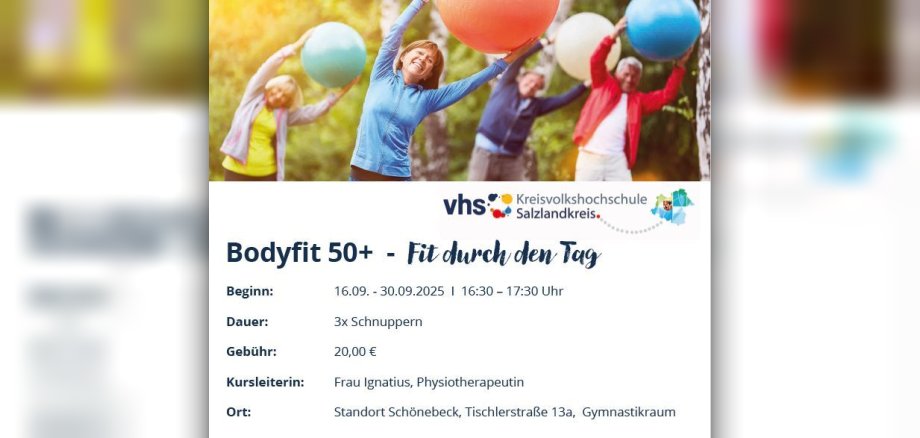
New in Schönebeck: Bodyfit 50+

Schönebeck. Anyone over the age of 50 who wants to strengthen their whole body and feel comfortable among like-minded people can try Bodyfit 50+.

The district adult education centre in Schönebeck is offering a taster course in September - starting on 16 September with three sessions from 4.30 to 5.30 p.m. - and a follow-up course in October with nine sessions at the same time of day.

"We strengthen and stretch the muscles, mobilise the joints and spine. We train our balance, learn relaxation exercises and go on fantasy journeys with suitable music and get through the day fit," says the course leader, describing her programme and inviting potential participants. As an active physiotherapist and licensed exercise instructor in rehabilitation sports, formerly a sports teacher, she would like to pass on her knowledge and experience at the KVHS.

Please register in advance! Information is also available online (kvhs.salzlandkreis.de) or by telephone (03471 684-624114).

Help with accessibility

  • General

    We strive to make our websites accessible to all users. Details can be found in our accessibility statement. You can send us your suggestions for improvement using our accessibility feedback form.

  • Font size

    To adjust the font size, please use the following key combinations:

    Larger

    ⌘command
    +

    Smaller

    ⌘command
    –

    Larger

    Ctrl
    +

    Smaller

    Ctrl
    –
  • Keyboard navigation

    Use TAB and SHIFT + TAB to navigate through next/previous links, form elements, and buttons.

    Use ENTER to open links and interact with elements.

  • Contrast mode

    Press the following key combination to reduce or increase the contrast:

    Enlarge

    ⌃control
    ⌥option
    ⌘command
    .

    Decrease

    ⌃control
    ⌥option
    ⌘command
    ,
    Note: The shortcuts must be activated in the system settings of the operating system.

    Press the left ALT key + left SHIFT key + PRINT to quickly turn high contrast mode on or off.

  • Invert colours

    Press the following key combination to switch the colour inversion on and off:

    ⌃control
    ⌥option
    ⌘command
    8
    Note: The shortcuts must be activated in the system settings of the operating system.

    First activate the screen magnifier and then switch the colour inversion on and off with the following key combinations:

    1. screen magnifier

    +

    2. invert colours

    Ctrl
    Old
    I
  • Screen magnifier

    Press the following key combinations to use the screen magnifier:

    Switch on/off

    ⌥option
    ⌘command
    8

    Enlarge view

    ⌥option
    ⌘command
    =

    Zoom out view

    ⌥option
    ⌘command
    –
    Note: The shortcuts must be activated in the system settings of the operating system.

    Switch on / Enlarge view

    +

    Zoom out view

    –