

Basic Support School Am Park Wolmirsleben
This page has been automatically translated. There may therefore be discrepancies and inaccuracies in the text. Only the original version is binding. Legal claims arising from the content of the translated version are excluded.

Offers

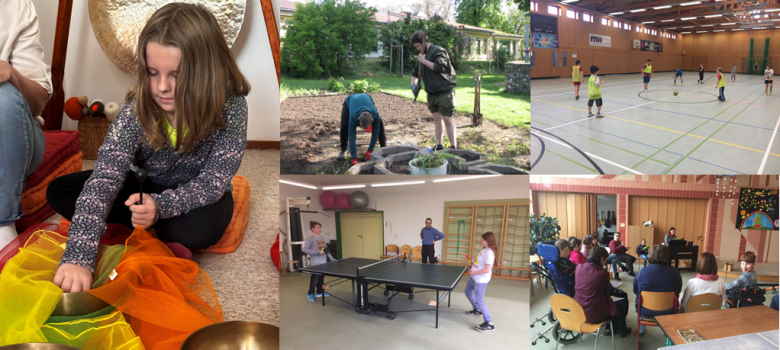
Photo collage of school offers


Therapy-orientated offers

  • Basal stimulation
  • Physiotherapy services
  • Speech and language therapy programmes
  • Singing bowl therapy
  • Occupational therapy services


Practice-orientated offerings | Career testing

Practical programmes and trials can be carried out in the following areas and fields of activity:

  • Wood and metal construction
  • Gardening and landscaping
  • Colour design
  • Housekeeping
  • Caretaker activities
  • Practical life activities
  • Partners we work with

    • Student company "Caféclique" (S-GmbH), "Am Park" school, Wolmirsleben
    • Lebenshilfe Bördeland GmbH, Luisenplatz branch office
    • BRAFO (BBRZ Staßfurt, An d. Löderburger Bahn)
    • Vocational Training and Rehabilitation Centre e.V., Rathmannsdorf
    • Local recreation centre "Großer Schachtsee", Wolmirsleben
    • Specialist integration service Saxony-Anhalt
    • Sangerhausen Employment Agency: Rehabilitation division.
    • Company "Siepe GmbH" in Staßfurt
    • Foundry Staßfurt GmbH - GSF
    • Schwarzer Netto Staßfurt
    • Kaufland Staßfurt
    • "Al Capone" - Ristorante & Pizzeria & Ice cream parlour
    • Hotel Salzland Centre
    • Edeka Centre Aschersleben
    • Klein Tyres & Car Technology Staßfurt
    • Lutz Lindenberg Tyre-Battery-Autoservice in Staßfurt
    • Laurentiushof retirement care home Etgersleben
    • Gut Klein Wanzleben Schweinezucht GmbH & Co. KG
    • Nursery Schrimpf K. Staßfurt
    • Alexis' Café
    • Pizzeria Stassfurt kebab house
    • B&K Industrieservice GmbH
    • Staßfurt Orphanage Foundation, Dr Otto Geiss House nursing home for the elderly
    • Staßfurt Orphanage Foundation, residential facility for the disabled Otto-Lüdecke-Haus
    • Van der Velde Agrar GmbH
    • Bauermeister nursery in Hecklingen
    • Bierer Berg Schönebeck native animal garden
    • Hotel & Restaurant Burgas in Staßfurt
    • Conrad Transporte e.K.

Working groups

  • Drum group "Boom-Bass-Sticks"
  • Pupil band
  • Choir
  • Pottery
  • Theatre group
  • Football group
  • Game: Table tennis & Co
  • Relaxation
  • Creative design
  • Caretaker group
  • Games and stories
  • Instrumental group


Home page

Help with accessibility

  • General

    We strive to make our websites accessible to all users. Details can be found in our accessibility statement. You can send us your suggestions for improvement using our accessibility feedback form.

  • Font size

    To adjust the font size, please use the following key combinations:

    Larger

    command
    +

    Smaller

    command

    Larger

    Ctrl
    +

    Smaller

    Ctrl
  • Keyboard navigation

    Use TAB and SHIFT + TAB to navigate through next/previous links, form elements, and buttons.

    Use ENTER to open links and interact with elements.

  • Contrast mode

    Press the following key combination to reduce or increase the contrast:

    Enlarge

    control
    option
    command
    .

    Decrease

    control
    option
    command
    ,
    Note: The shortcuts must be activated in the system settings of the operating system.

    Press the left ALT key + left SHIFT key + PRINT to quickly turn high contrast mode on or off.

  • Invert colours

    Press the following key combination to switch the colour inversion on and off:

    control
    option
    command
    8
    Note: The shortcuts must be activated in the system settings of the operating system.

    First activate the screen magnifier and then switch the colour inversion on and off with the following key combinations:

    1. screen magnifier

    +

    2. invert colours

    Ctrl
    Old
    I
  • Screen magnifier

    Press the following key combinations to use the screen magnifier:

    Switch on/off

    option
    command
    8

    Enlarge view

    option
    command
    =

    Zoom out view

    option
    command
    Note: The shortcuts must be activated in the system settings of the operating system.

    Switch on / Enlarge view

    +

    Zoom out view