This page has been automatically translated. There may therefore be discrepancies and inaccuracies in the text. Only the original version is binding. Legal claims arising from the content of the translated version are excluded.

Discover the Stone Age

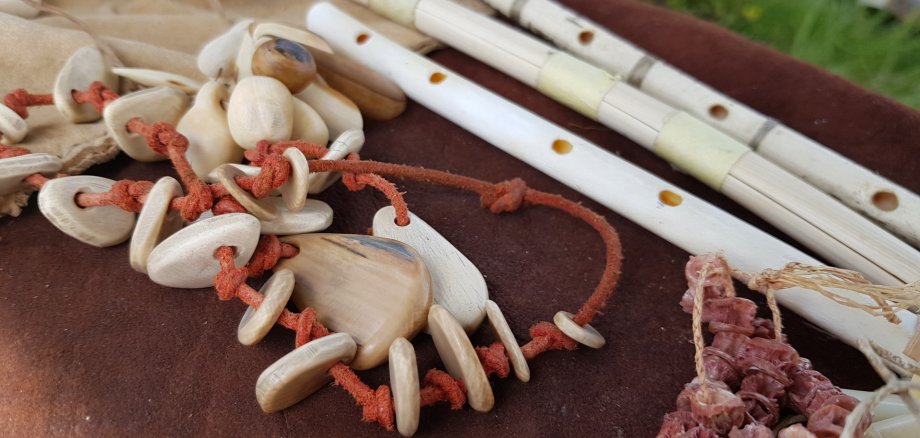
Schönebeck. This is how history comes to life: on Sunday 20 September, from 10 am to 4 pm in the courtyard of the Salzland Museum, the museum and the Pömmelte Ring Sanctuary, together with archaeotechnician Frank Trommer, invite you to an exciting day at the Archaeotechnical Family Day. You’ll find answers to many questions about archaeology, craftsmanship and life in prehistoric times – How did people live in the Stone Age? What tools did they use and how did they make jewellery? – as well as lasting insights, particularly through hands-on activities.

During live demonstrations, Frank Trommer provides vivid and entertaining insights into Stone Age techniques and shares scientific findings. But watching is by no means the only thing on offer: the programme includes numerous hands-on activities for the whole family. Visitors can get hands-on and, for example, create Stone Age jewellery and knives. Creative educational activities and other events invite visitors to discover history with their own hands.

The event is free of charge for all visitors, young and old. Refreshments will be provided by the Salzlandmuseum Friends’ Association, which is supporting the event.

Archaeological Family Day | Sunday 20 September, 10 am – 4 pm | Salzlandmuseum, Pfännerstraße 41, Schönebeck | Free admission

Help with accessibility

  • General

    We strive to make our websites accessible to all users. Details can be found in our accessibility statement. You can send us your suggestions for improvement using our accessibility feedback form.

  • Font size

    To adjust the font size, please use the following key combinations:

    Larger

    command
    +

    Smaller

    command

    Larger

    Ctrl
    +

    Smaller

    Ctrl
  • Keyboard navigation

    Use TAB and SHIFT + TAB to navigate through next/previous links, form elements, and buttons.

    Use ENTER to open links and interact with elements.

  • Contrast mode

    Press the following key combination to reduce or increase the contrast:

    Enlarge

    control
    option
    command
    .

    Decrease

    control
    option
    command
    ,
    Note: The shortcuts must be activated in the system settings of the operating system.

    Press the left ALT key + left SHIFT key + PRINT to quickly turn high contrast mode on or off.

  • Invert colours

    Press the following key combination to switch the colour inversion on and off:

    control
    option
    command
    8
    Note: The shortcuts must be activated in the system settings of the operating system.

    First activate the screen magnifier and then switch the colour inversion on and off with the following key combinations:

    1. screen magnifier

    +

    2. invert colours

    Ctrl
    Old
    I
  • Screen magnifier

    Press the following key combinations to use the screen magnifier:

    Switch on/off

    option
    command
    8

    Enlarge view

    option
    command
    =

    Zoom out view

    option
    command
    Note: The shortcuts must be activated in the system settings of the operating system.

    Switch on / Enlarge view

    +

    Zoom out view