This page has been automatically translated. There may therefore be discrepancies and inaccuracies in the text. Only the original version is binding. Legal claims arising from the content of the translated version are excluded.

Education

KVHS Bernburg: Needle, thread and felt - New exhibition

Bernburg. The KVHS in Bernburg invites you once again to come and see a new creative exhibition designed by Ute Kirstein from Saalestadt, featuring works made from felt. It is a show with quirky birds, dolls, flowers, hats, jewellery, scarves and decorative items.

Textile sculptures, abstract objects and everyday items reflect the incredible versatility of felt as a material. On display are objects that have been created with craftsmanship, creativity and a great deal of experimentation. In her objects, Ute Kirstein uses the technique of hand felting from natural wool. She plays with different colours and shapes and individually combines different materials.

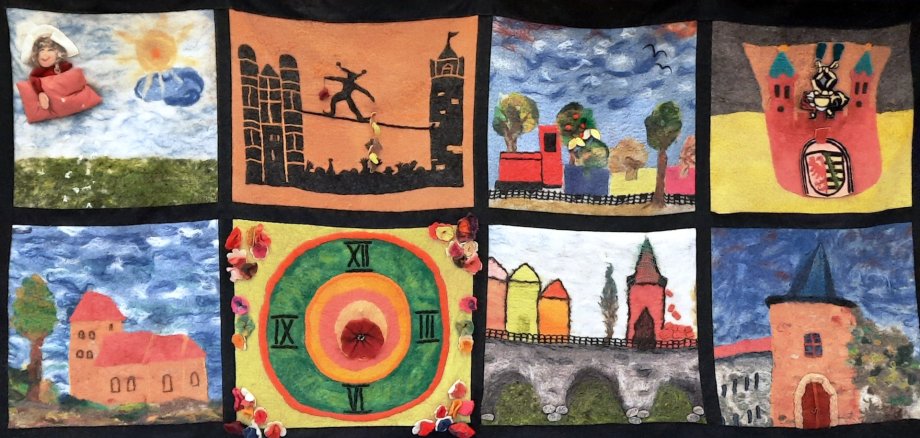
It is interesting to look at the large wall hanging (photo: Salzlandkreis/KVHS, Cornelia Zimmermann) as part of the exhibition. The "Waldauer Wollweiber", which includes textile designer Ute Kirstein, felted individual motifs and put them together to create an overall picture. The result was a tapestry with well-known Bernburg sights.

Each individual exhibit is unique and confirms the incredible variety of creative design possibilities offered by handmade felt. This makes a visit to the small exhibition exciting and perhaps even makes you want to take a closer look at the traditional craft of felting. The KVHS offers repeated courses for this, starting again on 13 February with felting for beginners in Bernburg under the direction of Ute Kirstein.

The exhibition "Needle, Thread and Felt" can be visited until the end of February during the opening hours of the KVHS in Bernburg, Vor dem Nienburger Tor 13a.

Information on the current offers online at:

+49 3471 684-624110

kvhs.salzlandkreis.de

Help with accessibility

  • General

    We strive to make our websites accessible to all users. Details can be found in our accessibility statement. You can send us your suggestions for improvement using our accessibility feedback form.

  • Font size

    To adjust the font size, please use the following key combinations:

    Larger

    ⌘command
    +

    Smaller

    ⌘command
    –

    Larger

    Ctrl
    +

    Smaller

    Ctrl
    –
  • Keyboard navigation

    Use TAB and SHIFT + TAB to navigate through next/previous links, form elements, and buttons.

    Use ENTER to open links and interact with elements.

  • Contrast mode

    Press the following key combination to reduce or increase the contrast:

    Enlarge

    ⌃control
    ⌥option
    ⌘command
    .

    Decrease

    ⌃control
    ⌥option
    ⌘command
    ,
    Note: The shortcuts must be activated in the system settings of the operating system.

    Press the left ALT key + left SHIFT key + PRINT to quickly turn high contrast mode on or off.

  • Invert colours

    Press the following key combination to switch the colour inversion on and off:

    ⌃control
    ⌥option
    ⌘command
    8
    Note: The shortcuts must be activated in the system settings of the operating system.

    First activate the screen magnifier and then switch the colour inversion on and off with the following key combinations:

    1. screen magnifier

    +

    2. invert colours

    Ctrl
    Old
    I
  • Screen magnifier

    Press the following key combinations to use the screen magnifier:

    Switch on/off

    ⌥option
    ⌘command
    8

    Enlarge view

    ⌥option
    ⌘command
    =

    Zoom out view

    ⌥option
    ⌘command
    –
    Note: The shortcuts must be activated in the system settings of the operating system.

    Switch on / Enlarge view

    +

    Zoom out view

    –