This page has been automatically translated. There may therefore be discrepancies and inaccuracies in the text. Only the original version is binding. Legal claims arising from the content of the translated version are excluded.

ÖSA money for the Salzland district

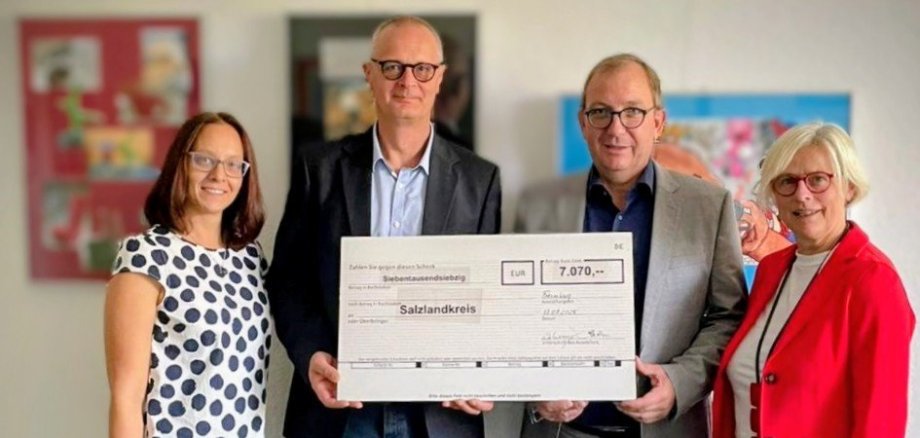
Bernburg. The Salzlandkreis district is set to receive €7,070. The district is receiving this sum from ÖSA Versicherungen in Saxony-Anhalt in recognition of its low claims ratio in 2024. District Administrator Markus Bauer accepted the symbolic cheque in Bernburg, welcoming ÖSA branch manager Heike Wehemeyer and agency manager Ronald Gattermann.

Markus Bauer expressed his thanks for the appreciation and reward. "The caring and foresighted handling of our municipal property is important to us anyway, because that is the basis for our work and our development - preparing for what might come and avoiding damage before it occurs. The district administration will do what it has always done: we will use the ÖSA money to support charitable projects run by committed people in the Salzland district."

ÖSA regularly involves municipalities insured with it in its economic success with a low loss ratio and loss prevention. Damage to municipal buildings is caused by fires, storms and mains water, but also by burglary. ÖSA protects policyholders against the financial consequences. So anyone who reduces risks through regular maintenance or technical modernisation and avoids damage to municipal buildings, inventory and assets benefits twice over.

Help with accessibility

  • General

    We strive to make our websites accessible to all users. Details can be found in our accessibility statement. You can send us your suggestions for improvement using our accessibility feedback form.

  • Font size

    To adjust the font size, please use the following key combinations:

    Larger

    ⌘command
    +

    Smaller

    ⌘command
    –

    Larger

    Ctrl
    +

    Smaller

    Ctrl
    –
  • Keyboard navigation

    Use TAB and SHIFT + TAB to navigate through next/previous links, form elements, and buttons.

    Use ENTER to open links and interact with elements.

  • Contrast mode

    Press the following key combination to reduce or increase the contrast:

    Enlarge

    ⌃control
    ⌥option
    ⌘command
    .

    Decrease

    ⌃control
    ⌥option
    ⌘command
    ,
    Note: The shortcuts must be activated in the system settings of the operating system.

    Press the left ALT key + left SHIFT key + PRINT to quickly turn high contrast mode on or off.

  • Invert colours

    Press the following key combination to switch the colour inversion on and off:

    ⌃control
    ⌥option
    ⌘command
    8
    Note: The shortcuts must be activated in the system settings of the operating system.

    First activate the screen magnifier and then switch the colour inversion on and off with the following key combinations:

    1. screen magnifier

    +

    2. invert colours

    Ctrl
    Old
    I
  • Screen magnifier

    Press the following key combinations to use the screen magnifier:

    Switch on/off

    ⌥option
    ⌘command
    8

    Enlarge view

    ⌥option
    ⌘command
    =

    Zoom out view

    ⌥option
    ⌘command
    –
    Note: The shortcuts must be activated in the system settings of the operating system.

    Switch on / Enlarge view

    +

    Zoom out view

    –