World time clock in Aschersleben
Half-timbered houses in Schönebeck
Lock in Bernburg (Saale)
Saalefee on the river Saale
This page has been automatically translated. There may therefore be discrepancies and inaccuracies in the text. Only the original version is binding. Legal claims arising from the content of the translated version are excluded.

District Senior Citizens' Council

District senior citizens' council has elected its board

Bernburg. Doreen Kügler, the district administration's head of social services, thanked all those present from the old and new advisory boards, the members and their deputies, for their willingness and voluntary commitment. The district senior citizens' advisory board consists of one representative from each of the municipalities and associations, works independently and meets regularly. Its aim is to represent the interests of the older generation in social discourse and to contribute to projects.

At the first meeting of the District Senior Citizens' Advisory Council, the new board was elected:

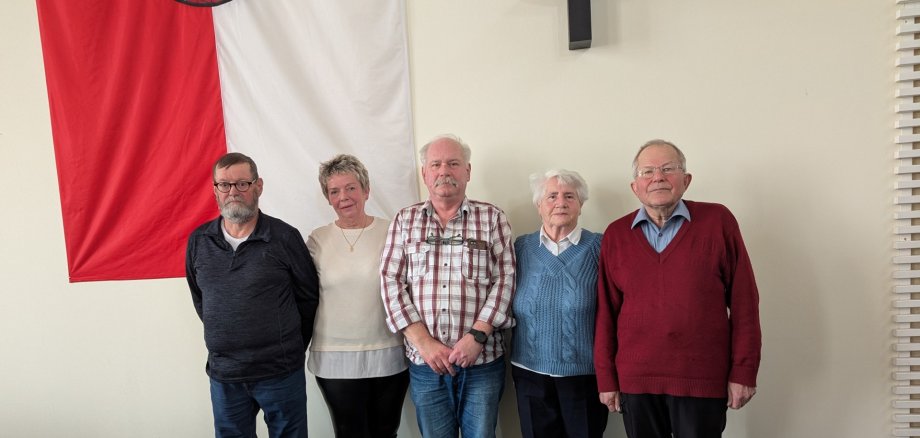
Dr Harald Lüdtkemeier (right in the picture) is the new chairman, Christine Pfeiffer (2nd from left) is the deputy chairman. In addition, Frank Kaina (centre) was appointed as secretary, Frank Habich (left) as treasurer and Annemarie Rockmann (2nd from right) as assessor.

The new Board also wants to get to work straight away and start by drawing up an annual work plan.

Help with accessibility

  • General

    We strive to make our websites accessible to all users. Details can be found in our accessibility statement. You can send us your suggestions for improvement using our accessibility feedback form.

  • Font size

    To adjust the font size, please use the following key combinations:

    Larger

    command
    +

    Smaller

    command

    Larger

    Ctrl
    +

    Smaller

    Ctrl
  • Keyboard navigation

    Use TAB and SHIFT + TAB to navigate through next/previous links, form elements, and buttons.

    Use ENTER to open links and interact with elements.

  • Contrast mode

    Press the following key combination to reduce or increase the contrast:

    Enlarge

    control
    option
    command
    .

    Decrease

    control
    option
    command
    ,
    Note: The shortcuts must be activated in the system settings of the operating system.

    Press the left ALT key + left SHIFT key + PRINT to quickly turn high contrast mode on or off.

  • Invert colours

    Press the following key combination to switch the colour inversion on and off:

    control
    option
    command
    8
    Note: The shortcuts must be activated in the system settings of the operating system.

    First activate the screen magnifier and then switch the colour inversion on and off with the following key combinations:

    1. screen magnifier

    +

    2. invert colours

    Ctrl
    Old
    I
  • Screen magnifier

    Press the following key combinations to use the screen magnifier:

    Switch on/off

    option
    command
    8

    Enlarge view

    option
    command
    =

    Zoom out view

    option
    command
    Note: The shortcuts must be activated in the system settings of the operating system.

    Switch on / Enlarge view

    +

    Zoom out view